Think of a cook making a dish for the first time. They look in the fridge, cut something, taste, add salt, taste again. They do not write the whole dish down in advance and then cook it blind. Every step depends on what the last taste told them.
An agent works the same way. You give it a task, and the harness runs a loop with three steps:
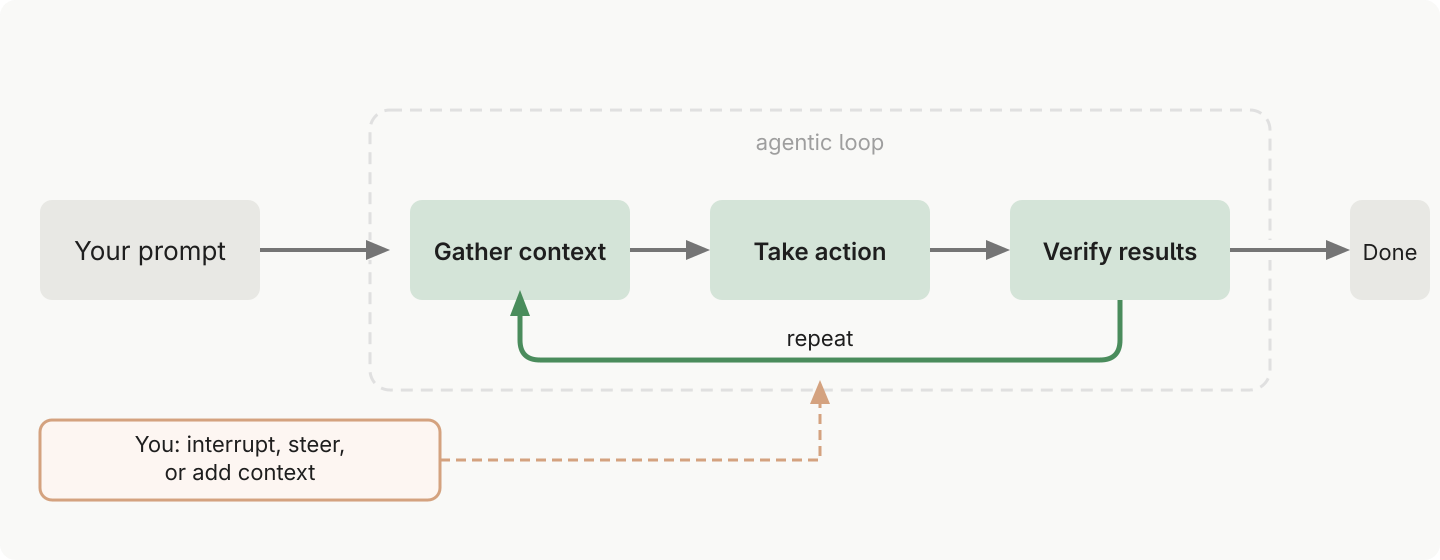
The agent loop. Diagram: Anthropic, Claude Code docs.
- Gather context. The model reads what it needs: lists the folder, opens files, searches the web.
- Take action. It writes a file, moves something, runs a program.
- Check the result. It opens what it wrote, compares totals, runs the test again.
Then it decides the next step based on what it just learned, and starts the loop again. A simple question may need only step 1. A real task goes through the loop dozens of times. Each round uses a tool, and each tool call is one line with a ⏺ in Claude Code. See Reading the Claude Code screen.
You are part of the loop too. Press Esc and it stops at once. Or type a correction and press Enter while it works: the message waits above the input box, and the agent reads it before its next step. You do not have to wait for the end to say “no, not like that”.
Example
“Make a table of every invoice in this folder, with the total at the bottom.”
- Gather: it lists the folder and finds 12 PDFs. It opens the first one to see where the amount is.
- Act: it reads all 12 and writes
invoices.mdwith the table. - Check: it adds up the column again and finds the sum does not match. One invoice has a credit note on page 2.
- Round two: it opens that invoice again, fixes the row, checks the sum once more. Done.
You saw each step as a ⏺ line. If you had seen it open a file from the wrong folder in the first round, you could have pressed Esc right there.
Why it matters for you
The loop is the difference between an answer and a finished job. A chat website gives you one answer and stops. An agent keeps going until the work is done, and checks itself on the way.
Three things follow:
- Describe the result, not the steps. The loop finds the steps. Say what “done” looks like, and how to check it. See Prompt and Verification.
- Watch the first rounds. Most wrong turns show in the first few ⏺ lines. That is the cheapest moment to stop it.
- Every round costs something. Each turn of the loop sends the whole context to the model again, so long loops use more tokens and more of your allowance.
Related
- Harness - the program that runs the loop
- Tool - what each round of the loop uses
- Agent - model plus harness plus tools, working in this loop
- Reading the Claude Code screen - where you see the loop happen
- Verification - making the “check” step count